Mary Murray • Product & UX Design
MBTA: Managing Rider Communication for Public Transit

Project Introduction
Summary
As a Senior Designer on the digital screens team at the MBTA (Massachusetts Bay Transit Authority), I redesigned the application that employees use to communicate service disruptions and Public Service Announcements (PSAs) to riders at stations via the PA/ESS system.
The PA/ESS system is made up of a visual and and audio component, so that service communication is accessible to as many riders as possible.
The audio component is the Public Address system (PA), and visual is the Electronic Signage System (ESS).

My role
I worked on all aspects of product design for this project: from discovery research to working with developers on implementation.
Challenge
At the MBTA, multiple departments and teams are involved in rider communication. Although each group deeply cares about the rider experience, they have different ideas for improving it and their own priorities.
Project goals
01.
The business need
From a business perspective, the application that employees used to create and manage communication on the PA/ESS system needed to be rebuilt in-house so the MBTA could competitively bid for new hardware.
Below are screenshots of the vendor software that needed to be rebuilt in-house.

Screenshots of the vendor software that needed to be replaced in order for the MBTA to competitively bid on a new PA/ESS system.
02.
The user experience opportunity
From a user experience perspective, this project was an opportunity to improve the user experience for MBTA riders, and Operation Information Officers (OIOs): MBTA staff responsible for communicating service disruption information to riders.
For OIOs, the goal was to design a more integrated and streamlined UI for communicating service disruptions.

Cartoon characters via Open Peeps
For riders, our goal was to deliver more accurate, timely service disruption messages more often by improving the user experience for the OIOs.

Design Approach

Discovery
Discovery methods used
-
Stakeholder Interviews
-
User Interviews
-
Group Ideation
-
Contextual Inquiry
Understanding the system
At the MBTA, multiple departments and teams are involved in communicating service disruptions to riders. Over time, these groups had created multiple applications for the ride touch points they were responsible for.
Although my research focused particularly on the PA/ESS system, I took a broad approach to discovery research to incorporate opportunities to simplify the system wherever possible.
Contextual inquiry
Contextual inquiry was a particularly impactful research method. I sat down with the OIOs, carefully observed them as they worked, and asked questions about what I observed. This allowed me to observe firsthand which applications OIOs were using and what their pain points were while using them. In general, I find contextual inquiry indispensable for learning what users may not tell you during interviews.
As part of contextual inquiry, I observed the OIOs work in the MBTA's Rail Operations Control Center (OCC) - a dark room dominated by a large screen displaying the current state of rail service.
The environment can at times be noisy and chaotic, as OIOs overhear important service information from dispatchers, field phone calls, and manage multiple applications.

Key Findings
01.
MBTA employees needed to use up to five applications to communicate and monitor service disruptions.
In some applications, they needed to reproduce the same functionality twice. This repetitive action slowed the workflow and increased the likelihood of human error.
Below is a short summary of four of the applications used. (Not shown is HootSuite, which was sometimes used to create and manage twitter/X messages.)

PA System
The 3rd-party application whose functionality needed to be rebuilt in-house.
The application was used to create long-form messaging for service disruptions, PSAs, and Emergency messaging.

Alerts UI
Allows MBTA employees to override messaging when logic from other systems results in incorrect or misleading messages on overhead signs.

Signs UI
Allows MBTA employees to override messaging when logic from other systems results in incorrect or misleading messages on overhead signs.

Screenplay
Allows MBTA employees to view current screen content and test messaging for planned, but not unplanned, service disruptions on most screens.
02.
For unplanned service disruptions, OIOs were unable to preview content for most screen types before those messages were posted to riders.
This meant that OIOs could not check that service disruption messages were accurate - and make adjustments to them before sending them out to riders.
03.
Because of the dark environment that they worked in, OIOs much preferred working with applications that had a "dark mode" or theme.
Of the four applications that OIOs used to manage rider communication, one had a dark theme.
Journey Maps
Based on my discovery research, I created detailed Journey Maps of planned and unplanned service disruptions.
Painpoints collected the the discovery research informed improvements made not to the PA Messaging application, but also to Alerts UI.

Jouney Map for unplanned service disruptions that result in Subway station closures, suspentions or shuttle buses.
Ideation & Refinement
Methods used
-
Low-fidelity wireframes
-
Concept testing
-
High Fidelity Prototypes
-
Usability testing
-
Group ideation sessions
Wireframes & Concept testing
Concept testing wireframes was a quick way to explore multiple possibilities and identify and solve problems early with the team and the OIOs.
Outcomes
The wireframes facilitated:
-
Discussion of project scope with the team by clearly define what we would and wouldn't include in the project.
-
Prioritized new features with OIOs
-
Incorporate engineers perspective and expertise in solving usability problems - including the ability to import Alert UI content by selecting alerts by alert text instead of Alert ID.
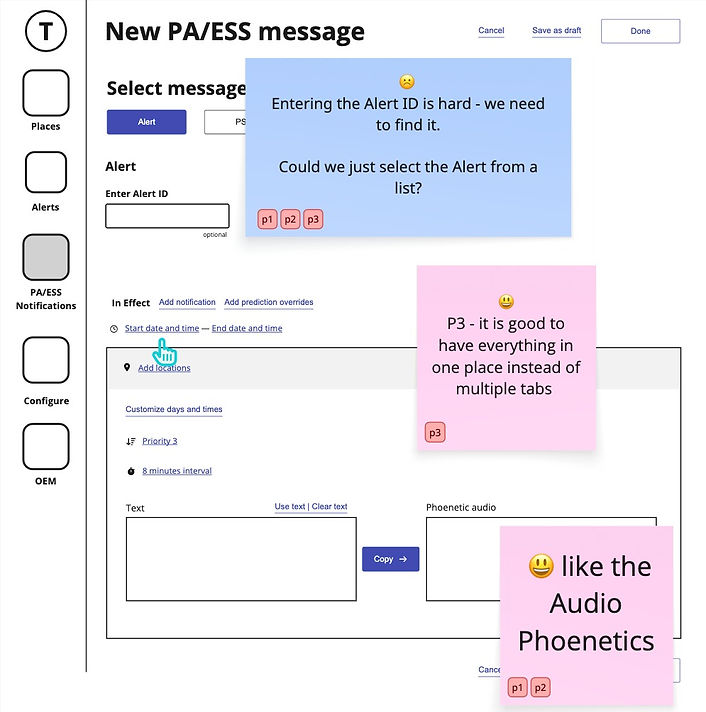
Prototyping & Usability testing
To ensure that the design worked as intended, I created a prototype of the application, and tested it with the OIOs in multiple usability sessions.
To the left is a portion of a synthesis session for one usability test.
Outcomes
The usability testing enabled us to make impactful adjustments to the design before it was implemented, including:
-
Adding the ability to schedule "End of service" and "Start of Service" with one click
-
Adding prewritten PSAs to the system.

Design System & Implementation
Design System
For this project, I created a design system in Figma - based on Bootstrap - that defined colors, text, components, and page layout, working from the principles outlined in Atomic Design.
Together with the team's lead developer, we are considering several frontend frameworks. The positives to using Bootstrap were that a number of other teams at the MBTA were already using it, and unlike some of the other options we considered, it would not cost the organization additional money.
A downside to using Bootstrap is that, unlike some other frameworks, it doesn’t offer an official Figma component library. There are free Figma Bootstrap libraries that community-minded designers have shared online, but they weren’t as easy to use or modify as some of the other front-end frameworks we explored.
This meant that, from a design perspective, quite a bit of work was needed to either modify Figma components from free component libraries or create them from scratch. This included creating the dark theme
Implementation

I worked closely with the developers during implementation - which took place over several sprints - reviewing designs in team meetings and also ad hoc meetings as needed.
Supporting files included wireframes designs with references to compoents in Figma, as well as some Figma files with more detailed page designs, and prototypes.
Before the designs were releaed, I QA the designs for visual and functional accuracy.
Outcomes
-
Although we couldn't combine the applications, integrating Alerts UI data into the application meant OIOs didn't have to repeat actions across two applications. Resulting in riders receiving service alerts sooner.
-
Enable workflow improvements, such as previewing and correcting audio pronunciation, selecting the start or end of the day with one click, and an improved information architecture for stations and zones.
-
Created a dark-themed design system whose components could be used for future projects.
Learnings
-
Stakeholder buy-in and alignment with the larger business goal were key to quickly implementing this project.
-
What might seem like small UI details can have a big impact on the user experience. Usability testing was key to identifying areas of the UI where users get stuck or slowed down.
What I would do different
This project was successful, but didn't get much attention from leadership. In retrospect, I would have worked with my project manager, department head, and UX supervisor to find ways to champion it more so we could leverage its success to further improve the MBTA's riders and employees experience.